Keep the tools you like. Drop the retyping.

TenantLoop does the accounting, payments, leasing and maintenance itself. These connections cover the rest, and each one says plainly whether it works today.

Working today

  • Stripe
  • Plaid
  • QuickBooks
  • Dropbox Sign
  • Google
  • Resend
  • Claude by Anthropic

Five that run every day. What each one moves, and which way.

All five work today, the AI ones on the plans named below. None of them needs a developer: you connect each one from TenantLoop's settings.

QuickBooks Online

TenantLoop to QuickBooks, or two-way for vendors and accounts

For owners and accountants who keep a QuickBooks company. Your TenantLoop ledger stays the source: if someone edits a synced entry in QuickBooks, the next sync puts TenantLoop's version back.

How the QuickBooks sync works

What moves

  • Accounts, mapped one by one to your QuickBooks chart, or created there for you
  • Properties as QuickBooks classes, tenants as customers, vendors as vendors
  • Journal entries, invoices, bills, payments and bill payments from your start date on
  • Two-way option: vendors and accounts you add in QuickBooks come into TenantLoop

Setting it up

Settings, then QuickBooks: sign in to Intuit, pick a sync start date and save the account mapping. The first sync starts right away, then runs daily or hourly. A Sync now button and a log of anything that failed sit on the same screen.
Stripe

Tenant to your own Stripe account, then your bank

Rent is charged on your own Stripe account, so the money never passes through ours. Stripe pays out to the bank account you choose there.

Fees and how tenants pay

What moves

  • Rent, deposits and fees paid by bank transfer (ACH) or card, once or on autopay
  • Each payment posts to the right lease ledger
  • A returned bank payment reverses itself on the ledger, with the returned-payment fee
  • Card disputes show on the payment, so you know which charge is being questioned

Setting it up

Settings, then merchant accounts: create or connect your Stripe account and finish Stripe's identity check. Tenants see a pay button in their portal once Stripe approves the account.

Plaid

Your bank to TenantLoop

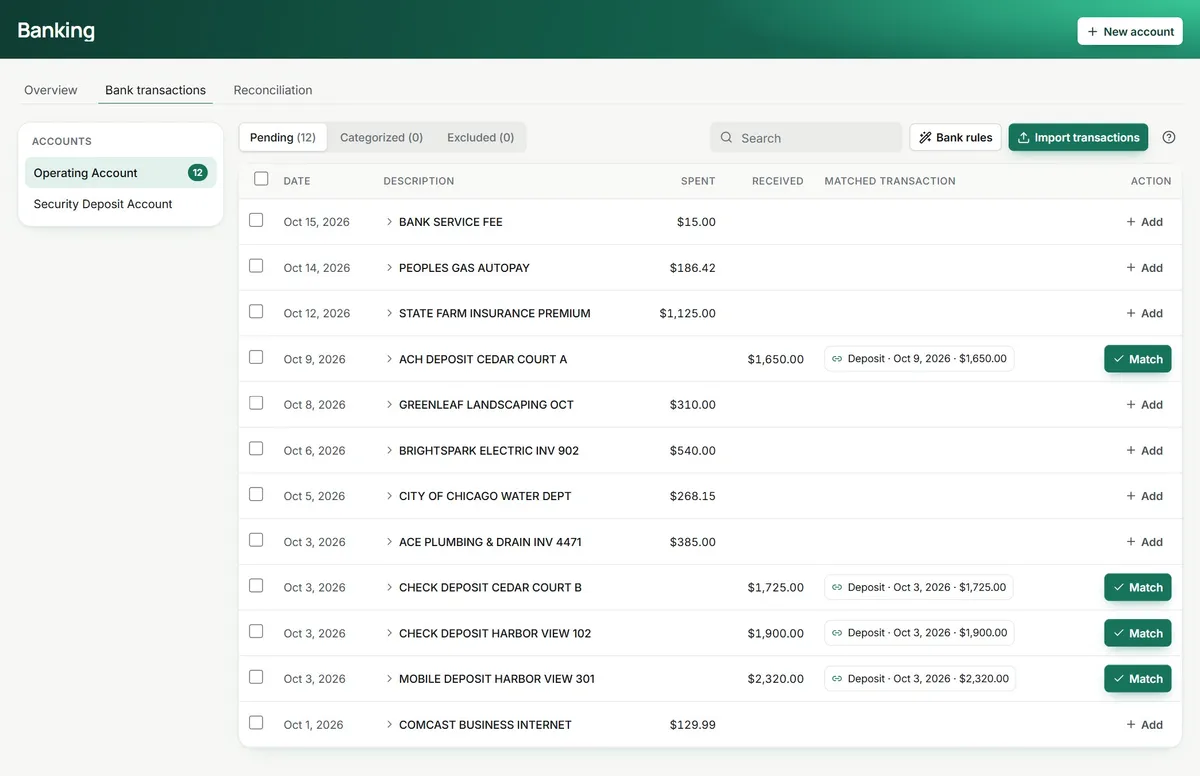
Connect operating, deposit and credit card accounts. New bank lines wait in a Pending list instead of going straight into the books, so nothing posts without you.

Bank feeds and matching
Pending bank lines for the operating account: the deposits each show a suggested match and a Match button, the bills show Add

What moves

  • Bank and card transactions, imported into Pending for each account
  • A suggested match when a recorded payment or deposit has the same amount within 10 days
  • Bank rules that file repeat lines (the water bill, the landscaper) to a category and property
  • A CSV import for any bank Plaid cannot reach

Setting it up

In Banking, connect an account: sign in to your bank through Plaid and choose which accounts to bring in. Matching and reconciliation happen on the same screen.

Dropbox Sign

TenantLoop to your signers, and the signed copy back

Leases, renewals, addenda and owner agreements go out for signature from the record they belong to. Nobody opens a second app.

Leases and e-signature

What moves

  • The document, with fields placed for each signer
  • Who was sent it, who viewed it, who signed and who declined, per signer
  • The signed copy with its certificate of completion, filed on the lease or property
  • A copy emailed to everyone once the last person signs

Setting it up

Nothing to connect: open a lease, renewal or property and send a signature request in six steps. Pro includes 10 requests a month and Premium 30; any others are $1.50 each.

Claude by Anthropic

Inside TenantLoop, on your own records

The AI Assistant and the agents run on Claude. By default, the steps that open a work order, pick a vendor or send an offer wait for your approval, and you decide what each agent may do on its own.

How the agents work

What moves

  • AI Assistant on Claude Sonnet 5.5, on Pro and Premium
  • Receptionist, Prospect, Maintenance Ops and Lease Renewal agents on Claude Opus 5.5, on Premium
  • A monthly AI allowance in the plan ($10 on Pro, $40 on Premium), with no overage charge
  • Connect with Claude: add TenantLoop to your own Claude as a connector, to ask about your data and add tasks, notes and prospects

Setting it up

Included in the plan: switch each agent on in its settings and set its approval steps. For your own Claude, an owner or admin approves the connector once, and Claude then works with that person’s permissions.

Also working today

  • Calendar linkA private link shows move-ins, move-outs, showings, tasks and work orders in Google Calendar, Apple Calendar or Outlook. Reset it any time and the old link stops working.
  • ResendDelivers TenantLoop email: statements, reminders, notices, signature requests and replies to tenants.
  • Google and Apple sign-inYour team signs in with a Google account or an Apple ID, with two-step verification on top.
  • TenantLoop API and webhooksA REST API for properties, units, leases, tenants, ledgers, bills, tasks, files and reports, plus signed webhooks for 21 events such as a new prospect or a returned payment. Keys act with the permissions of the person who made them.
  • Renters insurance trackingTenants add their policy and proof in the portal, and leases that require insurance keep asking until they do. Quotes from insurers come later.

Everything else, by category.

Most of these will connect through the TenantLoop Zapier app, which is built and waiting for Zapier to list it. Its triggers cover new prospects, leases, lease payments, returned payments, work orders, vendor bills, move-ins, move-outs, expiring renters insurance and upcoming rent changes. Its actions create prospects, tasks, expenses, lease charges and credits, and vendors.

Accounting and expenses

  • Zapier, coming soonExpensify, FreshBooks

Calendars and scheduling

  • Zapier, coming soonCalendly, Acuity Scheduling, OnceHub

Calls and chat

  • Coming soonTwilio: your own TenantLoop number for texts and calls
  • Zapier, coming soonSlack, Zoom, RingCentral

Contacts and CRM

  • Zapier, coming soonSalesforce, HubSpot, Pipedrive, Google Contacts, Copper, Insightly, Keap, Cloze

E-signatures

  • Zapier, coming soonDocuSign, SignNow

Email

  • Zapier, coming soonGmail, Microsoft Outlook, Microsoft 365, Mailchimp

Files and documents

  • Zapier, coming soonGoogle Drive, Google Sheets, Google Docs, Dropbox, Box, OneDrive, Evernote, Zoho WorkDrive

Forms and questionnaires

  • Zapier, coming soonGoogle Forms, Typeform, SurveyMonkey, Gravity Forms, Wufoo, Zoho Forms

Projects and tasks

  • Zapier, coming soonAsana, Trello, monday.com, Todoist, Basecamp, Wrike, Podio

Listings and residents

Repairs and vendors

  • Use alongsideHandy: add the pro as a vendor and send the work order; TaskEasy: lawn and snow crews as vendors, billed on the property

Build on TenantLoop

  • Coming soonZapier: the TenantLoop Zapier app is built and waiting for Zapier to list it

Before you connect anything.

Which integrations work today?

QuickBooks Online, Stripe, Plaid, Dropbox Sign and Claude, each described at the top of this page, plus the TenantLoop API and webhooks, Connect with Claude, the calendar link, email delivery through Resend, Google and Apple sign-in, and renters insurance tracking. Everything else on the page says coming soon or use alongside.

Does the QuickBooks sync change my TenantLoop books?

No. Transactions only go from TenantLoop to QuickBooks. With the two-way option, vendors and accounts you add in QuickBooks are brought into TenantLoop, but a synced journal entry edited in QuickBooks is put back to TenantLoop's version on the next sync.

Can Plaid move money out of my bank account?

No. The bank connection only reads transactions and the account balance. Tenant payments run through your own Stripe account, not through the bank connection.

What does "Zapier, coming soon" mean?

Our Zapier app is built but Zapier has not listed it yet. Once it does, you connect it with an API key from your own account: a TenantLoop event, such as a new prospect, a lease payment or a lease ending, starts a step in the other app, or a step there creates a prospect, task, expense, lease charge or vendor in TenantLoop. Zapier's own plan pricing applies.

Do my listings go to Zillow today?

Not yet. TenantLoop builds a listing feed in the format Zillow and the other listing sites accept, and each site has to approve it before your vacancies appear there. Until then you can share each listing's link and your company website.

Can my developer use the TenantLoop API?

Yes. The REST API covers properties, units, leases, tenants and prospects, owners, vendors, ledgers, bills, tasks, notes, files and reports, and webhooks report 21 kinds of events to your own HTTPS address, each delivery signed. Keys are made under Settings after a fresh two-step check, and each key works with the permissions of the person who made it, at up to 50 calls a minute. Read the developer docs and the API terms.

What does Connect with Claude do?

It adds TenantLoop as a connector in your own Claude (web, desktop, mobile or Claude Code). You can then ask about your rent roll, leases or open work orders in plain words, and have Claude add a task, a note or a prospect. An owner or admin approves the connection, Claude works with that person’s permissions, it cannot move money or delete anything, and you can disconnect it at any time. Setup steps are in the developer docs.

I build software for landlords. Can we connect?

Yes, through the API and webhooks, which are open on every plan. Write to us if you want to talk about a partnership or need an endpoint that is not there yet.

The tool I use is not here.

Tell us which one and what you would want to move between the two. Requests decide what we connect next.

Connect it to your own books.

14 days free, card up front, cancel in one click.