Your follow-ups, on autopilot.

Pick a trigger, line up the steps and let TenantLoop send the reminders and create the tasks on time, for every lease that fits, until the job is done.

14 days free on any plan. Card up front, cancel in one click.

Workflow templates for lease renewals, move in, move out, tenant welcome, pay-or-quit notice and conversation handoff, with a start from scratch card
6 templatesEvery plan

Set the rule once. It runs for every lease that fits.

Begin with the moment that matters

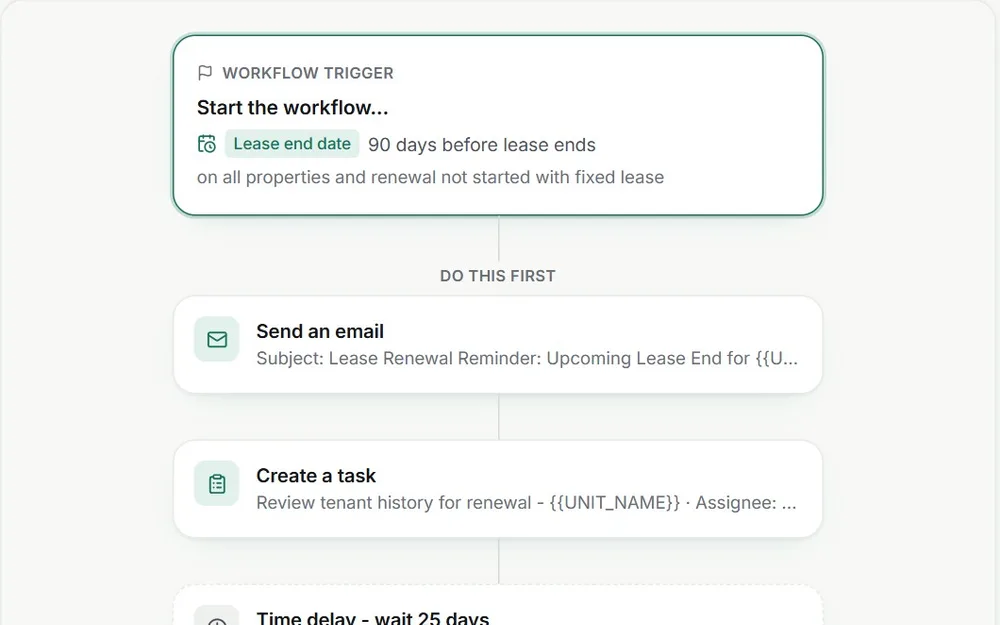
Start from a lease date, the day of the month, rent overdue by a number of days, or an event such as a payment received, a task created or a rental application submitted.

  • Before or after a lease starts, before it ends
  • Payment, task and application events
  • A cap of 50 steps per workflow
Workflow trigger card starting 90 days before lease end, followed by a send email step and a create task step
90 days before lease end

Only the leases you mean

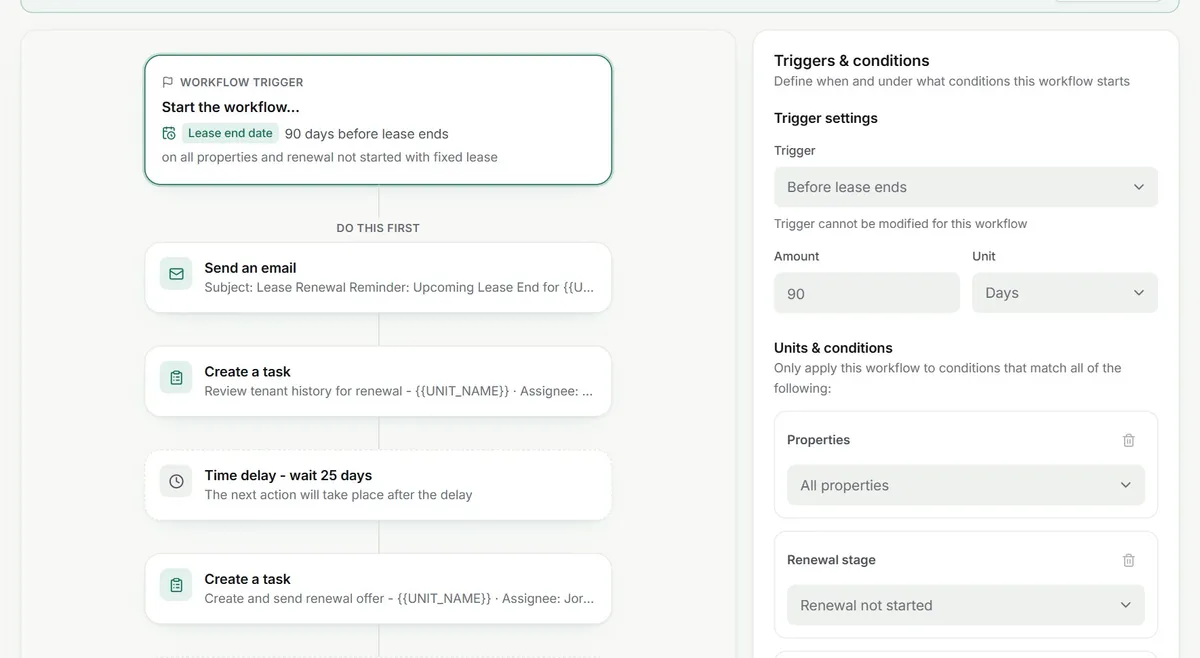
Narrow each workflow by property or unit, lease term type, renewal stage, outstanding balance and more. Exit rules end a run when the job is done, like the balance being paid.

  • Conditions by property, unit and lease
  • Exit rules for renewals, balances and inactive leases
  • Tags so one workflow can stop another
Triggers and conditions panel with Before lease ends, 90 days, all properties and renewal stage Renewal not started

only leases with no renewal yet

See every run, step by step

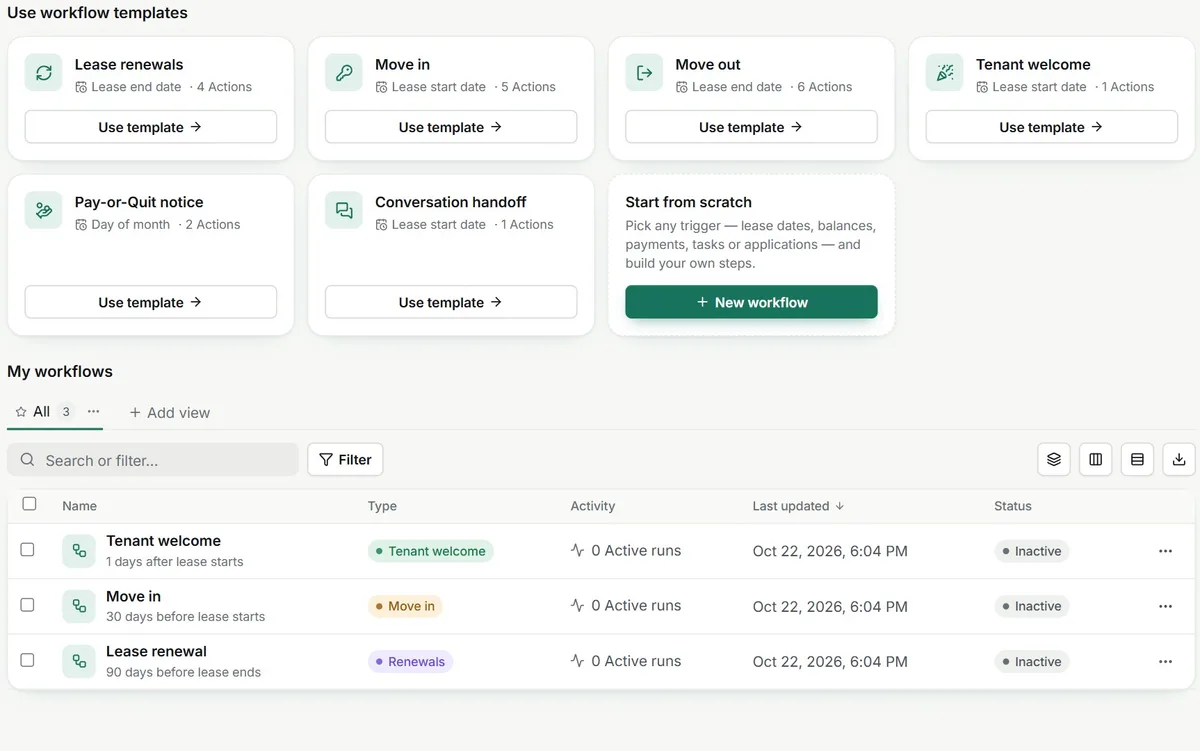
Each workflow shows its active runs. Open a run to see which steps finished, which are waiting and why one failed, so nothing happens out of sight.

  • Active runs per workflow
  • Step status with the reason for a failure
  • Switch a workflow off at any time
My workflows list with Tenant welcome, Move in and Lease renewal and their active runs

Start from a template.

Pick one and read the steps it runs.

Four of the six templates in the app, as they come. Change any step, timing or condition before you switch it on.

Starts

90 days before the lease ends

All properties, fixed-term leases, renewal not started

  1. Send an emailEmail you a renewal reminder with a link to the lease
  2. Create a taskReview tenant history for renewal
  3. Add a delayWait 25 days
  4. Create a taskCreate and send the renewal offer
  5. Add a delayWait 25 days
  6. Create a taskFinalize the renewal lease and send it for signatures

Ends a run when The renewal is marked Renewed or Not renewing

Starts

30 days before the lease ends

All properties, fixed-term leases, tenant not renewing

  1. Create a taskPrepare for move-out
  2. Send an emailEmail the tenants move-out instructions and a checklist
  3. Create a taskSchedule the final walkthrough and key drop
  4. Send an emailEmail the owner about the upcoming move-out
  5. Create a taskReceive keys and document the condition
  6. Create a taskPrepare the security deposit itemization

Ends a run when The renewal stage changes, for example the tenant renews after all

Starts

The 15th of every month

All properties, balance over $100

  1. Send an emailEmail the tenants a notice to pay or quit with the balance
  2. Add a delayWait 10 days
  3. Create a taskHigh priority task to follow up on the unpaid balance

Ends a run when The outstanding balance is paid

Starts

1 day after the lease starts

All properties, fixed-term leases

  1. Send an emailEmail the tenants a welcome and ask how the move-in went

Ends a run when After the last step

On day one. Automation that ships on every plan.

  • Six ready-made templates and a blank canvas
  • Emails, tasks, notes, charges and delays as steps
  • Exit rules that stop a run when the job is done
  • A run log for every lease the workflow touched

Works with

  • Stripe
  • Plaid
  • QuickBooks
  • Dropbox Sign
  • Google
  • Resend
  • Claude by Anthropic
See integrations

Before you automate.

What managers ask about workflows.

Is building a workflow a big project?

Minutes if you start from a template: Lease renewals, Move in, Move out, Tenant welcome, Pay-or-Quit notice or Conversation handoff. Adjust the timing and wording, pick the properties, then switch it on. You can also start from scratch.

What can start a workflow?

A date on the lease (before it starts, after it starts, before it ends), a day of the month, rent overdue by a number of days, or an event: a lease is created, a payment is received, a task is created or changes status, or a rental application is submitted.

What if one step fails?

The step is marked Failed with the reason, for example a tenant with no email address, and the run carries on with the next step. The run shows how many steps finished and how many failed, so you can fix the record and follow up yourself.

Can it text tenants?

“Send a text message” is a step you can add today, but texts only go out once your TenantLoop number is switched on, which is coming soon. Until then those steps wait as pending, and email steps run as normal.

Can I change a workflow that is already running?

Yes. Saved changes apply to current and future runs. Steps that already ran stay in the run history. If a teammate is editing the same workflow, it is locked for everyone else until they finish.

How is this different from a recurring task?

A recurring task repeats on a calendar. A workflow follows a record: it starts from that lease, payment or task, fills in the tenant’s name and balance, waits between steps and stops by itself when an exit rule is met, like the balance being paid.

Does it replace my team?

No. It sends the routine emails and creates the tasks on time, and the tasks are still done by people. Every run is logged step by step, so you can see what it did for whom.

Which follow-up will you never send by hand again?

14 days free, card up front, cancel in one click.